• Ernie Ball
  • MusicMan
  • Sterling by MusicMan

Majesty with no sound

Cspence27870

New member
Joined
Nov 22, 2017
Messages
4
<div class="bbWrapper">I just got a music man majesty a few hours ago. Finally get home and plug it in. Has sound for about 1 second then nothing. I can pull the cable out plug and plug it back and and it&#039;s always the same thing. Changed the batteries and it&#039;s the same thing. Any suggestions?</div>
 
<div class="bbWrapper">I just noticed if I unplug the cable, plug it back in and hold down the peizo volume knob I have sound until i let off of it.</div>
 
Last edited:
<div class="bbWrapper">After jacking in, toggle the piezo selector switch (the one near your left breast). Sometimes (I think) the guitar thinks there&#039;s no cable so it shuts off the preamp and you need to wake it up. Works for me when this happens.<br /> <br /> <br /> <div style="text-align: center"><a href="http://www.dibart.com/machines/guitar_gallery/index.html" target="_blank" class="link link--external" rel="nofollow ugc noopener"><img src="http://www.dibart.com/ebmm_sig_wht.jpg" data-url="http://www.dibart.com/ebmm_sig_wht.jpg" class="bbImage " loading="lazy" style="" width="" height="" /></a>&#8203;</div></div>
 
<div class="bbWrapper"><blockquote data-attributes="member: 9620" data-quote="dibart77" data-source="post: 1024828" class="bbCodeBlock bbCodeBlock--expandable bbCodeBlock--quote js-expandWatch"> <div class="bbCodeBlock-title"> <a href="/goto/post?id=1024828" class="bbCodeBlock-sourceJump" rel="nofollow" data-xf-click="attribution" data-content-selector="#post-1024828">dibart77 said:</a> </div> <div class="bbCodeBlock-content"> <div class="bbCodeBlock-expandContent js-expandContent "> After jacking in, toggle the piezo selector switch (the one near your left breast). Sometimes (I think) the guitar thinks there&#039;s no cable so it shuts off the preamp and you need to wake it up. Works for me when this happens.<br /> <br /> <br /> <div style="text-align: center"><a href="http://www.dibart.com/machines/guitar_gallery/index.html" target="_blank" class="link link--external" rel="nofollow ugc noopener"><img src="http://www.dibart.com/ebmm_sig_wht.jpg" data-url="http://www.dibart.com/ebmm_sig_wht.jpg" class="bbImage " loading="lazy" style="" width="" height="" /></a>&#8203;</div> </div> <div class="bbCodeBlock-expandLink js-expandLink"><a role="button" tabindex="0">Click to expand...</a></div> </div> </blockquote><br /> Still nothing man <img class="smilie smilie--emoji" alt="😑" src="https://cdn.jsdelivr.net/joypixels/assets/8.0/png/unicode/64/1f611.png" title="Expressionless face :expressionless:" data-shortname=":expressionless:" loading="lazy" width="64" height="64" /></div>
 
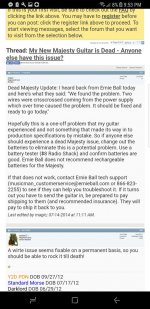
<div class="bbWrapper"><blockquote data-attributes="member: 4915" data-quote="DrKev" data-source="post: 1024832" class="bbCodeBlock bbCodeBlock--expandable bbCodeBlock--quote js-expandWatch"> <div class="bbCodeBlock-title"> <a href="/goto/post?id=1024832" class="bbCodeBlock-sourceJump" rel="nofollow" data-xf-click="attribution" data-content-selector="#post-1024832">DrKev said:</a> </div> <div class="bbCodeBlock-content"> <div class="bbCodeBlock-expandContent js-expandContent "> Time to call customer service and/or your dealer. </div> <div class="bbCodeBlock-expandLink js-expandLink"><a role="button" tabindex="0">Click to expand...</a></div> </div> </blockquote><br /> I already have. I&#039;ve gotten a shipping label from them. Just wanted to make sure someone hasn&#039;t ran into this issue and had a quick fix. Like i said I just bought it yesterday and really don&#039;t want to send it in lol i want to play it. But I found another thread where someone was having the exact same issue and sent it in. It had some criss crossed wires from the power supply.</div>
 

Attachments

  • Screenshot_20171122-215334.jpg
    Screenshot_20171122-215334.jpg
    121.2 KB · Views: 393
  • Screenshot_20171122-215355.jpg
    Screenshot_20171122-215355.jpg
    113.3 KB · Views: 404
<div class="bbWrapper">So frustrating but what can I tell you, no production line of any guiitar maker is 100% perfect and you&#039;ve just been unlucky in this particular instance. But EBMM customer service are excellent and they&#039;ll look after you! <br /> <br /> Welcome to the forum!</div>
 
<div class="bbWrapper">Many wags that I know would say this is the perfect guitar for me in it&#039;s present condition. <img src="https://cdn.jsdelivr.net/joypixels/assets/8.0/png/unicode/64/1f642.png" class="smilie smilie--emoji" loading="lazy" width="64" height="64" alt=":)" title="Smile :)" data-smilie="1"data-shortname=":)" /></div>
 
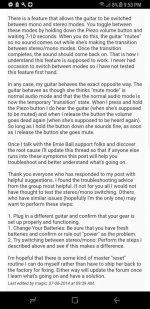
<div class="bbWrapper">Had similar problem with my Majesty. No sound at all brand new from box. Posted a couple messages here. Installed new batteries, same thing. Turns out I had to push in and hold the Piezo volume knob while looking at the back plate of the guitar. There are two lights (Amber &amp; Blue). Hold the knob in, the Amber light should come on briefly. Keep holding, the Blue light should show, then go out. After that, everything worked as it should. But I had to go through that routine every time I plugged it in (sometimes twice). Recently however, it just works when I plug in with no problem. Not sure what changed. I do know one thing. The instruction sheet sucks! Instead of some crappy sketched diagram trying to explain the operation with drawn pictures, just explain the operation modes in plain ENGLISH. Is that to much to ask for a 2k+ instrument? Hope this helps if you haven&#039;t already sent the guitar back!</div>
 
Last edited:
<div class="bbWrapper">I&#039;m having the same problem,<br /> sound for 1 second when plugged in then nothing.<br /> or if i hold the pizo volume in while plugin it in it will have sound until i release it.<br /> <br /> i have tryed switching between mono and stereo but it hasent fixed the problem.<br /> <br /> im going to be playing the next few gigs with gaffa tape holding the pizo vollume down but this is going to be anoying.<br /> has anyone found a fix for this?</div>
 
<div class="bbWrapper"><blockquote data-attributes="member: 41981" data-quote="kyfisher" data-source="post: 1049266" class="bbCodeBlock bbCodeBlock--expandable bbCodeBlock--quote js-expandWatch"> <div class="bbCodeBlock-title"> <a href="/goto/post?id=1049266" class="bbCodeBlock-sourceJump" rel="nofollow" data-xf-click="attribution" data-content-selector="#post-1049266">kyfisher said:</a> </div> <div class="bbCodeBlock-content"> <div class="bbCodeBlock-expandContent js-expandContent "> I&#039;m having the same problem,<br /> SNIP<br /> has anyone found a fix for this? </div> <div class="bbCodeBlock-expandLink js-expandLink"><a role="button" tabindex="0">Click to expand...</a></div> </div> </blockquote><br /> I had for the most part the same issue apart from the trick with holding down the piezo volume. <br /> <br /> Anyway contact EBMM service they are super fast and helpful.<br /> <br /> The first thing i got to do before sending the guitar in is this procedure: <br /> <br /> Reset procedure that will reset the electronics in the Majesty. Try plugging the guitar in, removing the batteries and leaving the batteries out for 5 minutes. Once the 5 minutes is up: remove the plug then reinstall the batteries</div>
 
<div class="bbWrapper"><blockquote data-attributes="member: 41981" data-quote="kyfisher" data-source="post: 1049266" class="bbCodeBlock bbCodeBlock--expandable bbCodeBlock--quote js-expandWatch"> <div class="bbCodeBlock-title"> <a href="/goto/post?id=1049266" class="bbCodeBlock-sourceJump" rel="nofollow" data-xf-click="attribution" data-content-selector="#post-1049266">kyfisher said:</a> </div> <div class="bbCodeBlock-content"> <div class="bbCodeBlock-expandContent js-expandContent "> I&#039;m having the same problem,<br /> sound for 1 second when plugged in then nothing.<br /> or if i hold the pizo volume in while plugin it in it will have sound until i release it.<br /> <br /> i have tryed switching between mono and stereo but it hasent fixed the problem.<br /> <br /> im going to be playing the next few gigs with gaffa tape holding the pizo vollume down but this is going to be anoying.<br /> has anyone found a fix for this? </div> <div class="bbCodeBlock-expandLink js-expandLink"><a role="button" tabindex="0">Click to expand...</a></div> </div> </blockquote><br /> Hi, I have exact same problem. What whas the result? Solved?</div>
 
<div class="bbWrapper">Just noticed that I had posted about this a couple years ago! I know it sounds silly, but put in fresh batteries. I got a Majesty brand new and it was DOA. You need the batteries for both Magnetic &amp; Piezo. And the instructions kinda suck. The diagrams tell you squat. I finally saw a Youtube review explaining what the LED&#039;s on back mean. Amber light x1 = Mono, Amber Light x2 = Stereo. Plus the Coil split is only active in the middle position. Would be nice if they put that in words on the instruction sheet.</div>
 
Last edited:
<div class="bbWrapper"><blockquote data-attributes="member: 35966" data-quote="Cspence27870" data-source="post: 1024826" class="bbCodeBlock bbCodeBlock--expandable bbCodeBlock--quote js-expandWatch"> <div class="bbCodeBlock-title"> <a href="/goto/post?id=1024826" class="bbCodeBlock-sourceJump" rel="nofollow" data-xf-click="attribution" data-content-selector="#post-1024826">Cspence27870 said:</a> </div> <div class="bbCodeBlock-content"> <div class="bbCodeBlock-expandContent js-expandContent "> I just noticed if I unplug the cable, plug it back in and hold down the peizo volume knob I have sound until i let off of it. </div> <div class="bbCodeBlock-expandLink js-expandLink"><a role="button" tabindex="0">Click to expand...</a></div> </div> </blockquote>This fixed it! I used a guitar pick sharpener and made the piezo knob be held down in place with it and now I can play again!!!! I&#039;m gonna make a video about it but it&#039;s literally that simple and it works perfectly! Thank you so much! <img class="smilie smilie--emoji" alt="😁" src="https://cdn.jsdelivr.net/joypixels/assets/8.0/png/unicode/64/1f601.png" title="Beaming face with smiling eyes :grin:" data-shortname=":grin:" loading="lazy" width="64" height="64" /></div>
 
<div class="bbWrapper"><blockquote data-attributes="member: 69707" data-quote="Codymichaelmcnamara" data-source="post: 1079466" class="bbCodeBlock bbCodeBlock--expandable bbCodeBlock--quote js-expandWatch"> <div class="bbCodeBlock-title"> <a href="/goto/post?id=1079466" class="bbCodeBlock-sourceJump" rel="nofollow" data-xf-click="attribution" data-content-selector="#post-1079466">Codymichaelmcnamara said:</a> </div> <div class="bbCodeBlock-content"> <div class="bbCodeBlock-expandContent js-expandContent "> This fixed it! I used a guitar pick sharpener and made the piezo knob be held down in place with it and now I can play again!!!! I&#039;m gonna make a video about it but it&#039;s literally that simple and it works perfectly! Thank you so much! <img class="smilie smilie--emoji" alt="😁" src="https://cdn.jsdelivr.net/joypixels/assets/8.0/png/unicode/64/1f601.png" title="Beaming face with smiling eyes :grin:" data-shortname=":grin:" loading="lazy" width="64" height="64" /> </div> <div class="bbCodeBlock-expandLink js-expandLink"><a role="button" tabindex="0">Click to expand...</a></div> </div> </blockquote> Hi Cody I have the same issueonly one second for sound,could you please explain how you fix this? I really appreciate your support! Thanks in advance!</div>
 
Last edited:
<div class="bbWrapper"><blockquote data-attributes="member: 35966" data-quote="Cspence27870" data-source="post: 1024824" class="bbCodeBlock bbCodeBlock--expandable bbCodeBlock--quote js-expandWatch"> <div class="bbCodeBlock-title"> <a href="/goto/post?id=1024824" class="bbCodeBlock-sourceJump" rel="nofollow" data-xf-click="attribution" data-content-selector="#post-1024824">Cspence27870 said:</a> </div> <div class="bbCodeBlock-content"> <div class="bbCodeBlock-expandContent js-expandContent "> I just got a music man majesty a few hours ago. Finally get home and plug it in. Has sound for about 1 second then nothing. I can pull the cable out plug and plug it back and and it&#039;s always the same thing. Changed the batteries and it&#039;s the same thing. Any suggestions? </div> <div class="bbCodeBlock-expandLink js-expandLink"><a role="button" tabindex="0">Click to expand...</a></div> </div> </blockquote>Step one, make sure your guitar is unplugged. Then take anything you can to either stick between the piezo volume knob or just tape it down with strong tape so it&#039;s held down the whole time, then plug the guitar in to your setup and then look at the back led. It should blink orange 2 or 3 times then turn blue and it&#039;s good to go for now!<br /> <br /> Step 2, call Ernie ball and get a replacement from the warranty if you have it because I was two years late on my warranty <img class="smilie smilie--emoji" alt="🤣" src="https://cdn.jsdelivr.net/joypixels/assets/8.0/png/unicode/64/1f923.png" title="Rolling on the floor laughing :rofl:" data-shortname=":rofl:" loading="lazy" width="64" height="64" /> the fix will still work but you are so much better off getting a replacement since the problem is in the default hardware with the majesty&#039;s that were made in 2019. This is only a temporary fix so you are best off getting a new one instead of trying to fight the problem. Ernie ball can send you the new hardware but it&#039;s way too much to solder yourself if you aren&#039;t use to reading blueprints and have good hand eye coordination and experience with soldering.</div>
 
<div class="bbWrapper"><blockquote data-attributes="member: 69707" data-quote="Codymichaelmcnamara" data-source="post: 1080269" class="bbCodeBlock bbCodeBlock--expandable bbCodeBlock--quote js-expandWatch"> <div class="bbCodeBlock-title"> <a href="/goto/post?id=1080269" class="bbCodeBlock-sourceJump" rel="nofollow" data-xf-click="attribution" data-content-selector="#post-1080269">Codymichaelmcnamara said:</a> </div> <div class="bbCodeBlock-content"> <div class="bbCodeBlock-expandContent js-expandContent "> Step one, make sure your guitar is unplugged. Then take anything you can to either stick between the piezo volume knob or just tape it down with strong tape so it&#039;s held down the whole time, then plug the guitar in to your setup and then look at the back led. It should blink orange 2 or 3 times then turn blue and it&#039;s good to go for now!<br /> <br /> Step 2, call Ernie ball and get a replacement from the warranty if you have it because I was two years late on my warranty <img class="smilie smilie--emoji" alt="🤣" src="https://cdn.jsdelivr.net/joypixels/assets/8.0/png/unicode/64/1f923.png" title="Rolling on the floor laughing :rofl:" data-shortname=":rofl:" loading="lazy" width="64" height="64" /> the fix will still work but you are so much better off getting a replacement since the problem is in the default hardware with the majesty&#039;s that were made in 2019. This is only a temporary fix so you are best off getting a new one instead of trying to fight the problem. Ernie ball can send you the new hardware but it&#039;s way too much to solder yourself if you aren&#039;t use to reading blueprints and have good hand eye coordination and experience with soldering. </div> <div class="bbCodeBlock-expandLink js-expandLink"><a role="button" tabindex="0">Click to expand...</a></div> </div> </blockquote>Step one worked for me. Had an issue at rehearsal last night, with I knew this then.</div>

 
<div class="bbWrapper">First of all, check the battery in the holder stays right in place for such issues!!<br /> I had the same issue with my Luke III and the problem there was that battery had poor contact with pins!<br /> I just used a small folded piece of paper placed on the battery&#039;s bottom to keep it right in place in the holder and problem is solved!<br /> Those Gotoh holders are made of plastic....and plastic is not a perfect material, even new.<br /> <br /> I started thinking about faulty jack, pickup switch, electronics....and the problem was simpler a lot.</div>
 
Last edited:
Back
Top Bottom